No — keyboard entry works. Barcodes speed high-volume sites when scanners are available.

Live product · production ready
Receive goods, track SKUs across locations, pick and dispatch orders, and reconcile stock without guessing what is on the shelf. Global Orbit warehouse software gives operators a live picture of inventory movement — demonstration dashboards on this page use sample quantities, not your warehouse.
SKU ledger
Movement history
Locations
Bins & warehouses
Alerts
Thresholds
Reports
Stock valuation
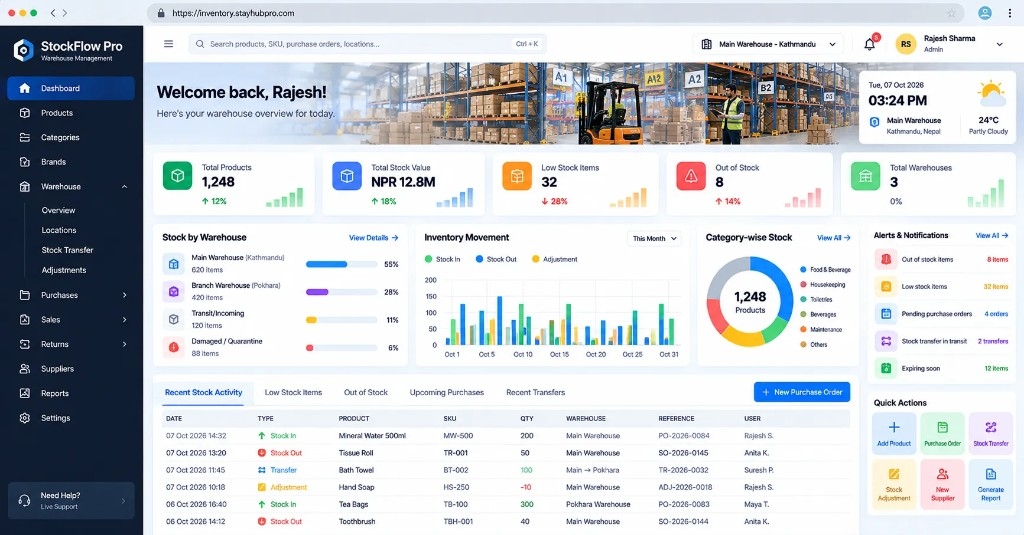
Warehouse modules power distributors and retail chains we deploy in Nepal. Numbers in marketing previews are illustrative; your tenant shows your SKUs, locations, and on-hand counts.
Barcode scanning and serial tracking are enabled when hardware and scope are included — we confirm during discovery rather than assuming every site has scanners day one.
Stock errors show up as angry customers, emergency purchases, and auditors asking why the system says five hundred but the shelf says three hundred.
A warehouse management system records every receipt, transfer, adjustment, and dispatch with who did it and when. Managers trust the count; pickers follow lists instead of memory.
Global Orbit WMS pairs naturally with billing when you sell from the same catalogue, and with POS when shops pull from a central warehouse.
Interactive layout below uses demonstration metrics. Production tenants show your data only.
Real-time balances by SKU and location after each movement.
Pick lists sorted by aisle or bin when location data is maintained.
Adjustments require reason codes and user attribution.
Batch and expiry tracking when those fields are enabled for your vertical.
Codes, units, categories, and optional barcodes.
Goods inward matched to purchase orders when PO module is used.
Move inventory between warehouses or bins with in-transit visibility.
Controlled corrections after cycle counts.
Fulfill sales or transfer orders with quantity confirmation.
Link receipts to vendors for payable reconciliation with billing.
Slot-level inventory when you maintain a location map.
Traceability for electronics, pharma-style lots, or warranty items.
Minimum stock thresholds with suggested purchase quantities.
Handheld or camera scanning when devices are provisioned.
Partial counts without shutting down the whole warehouse.
Separate rights for receivers, pickers, and managers.
Scan or enter incoming quantities against PO or ad-hoc receipt.
Put-away to bin locations if you use slot tracking.
Allocate stock to sales orders or transfers.
Confirm picked quantities; note shortages immediately.
Deduct on-hand and hand off to logistics with documentation.
Fast-moving SKUs with daily van loading and returns processing.
Serial capture on receipt and dispatch for warranty tracking.
Central warehouse replenishes shops via transfer orders.
Accuracy metrics and ageing stock reports.
Clear lists and fewer wrong-item walks.
Reorder signals tied to actual movement, not gut feel.
Valuation exports aligned with movement history.
High SKU count with van sales and returns.
Raw material issues to production when paired with manufacturing modules.
Pick-pack-ship with status back to order desk.
Billing and POS can consume the same SKU master when licensed together, reducing duplicate item setup.
Accounting exports and third-party logistics APIs are scoped per project.
User attribution on movements; restricted rights to post adjustments.
Backups and HTTPS per production hosting agreement.
Opening stock take establishes baseline; then receipts and dispatches go live.
Barcode label templates and scanner pairing happen during pilot week if hardware is ready.
Stock on hand, movement history, ageing, and ABC-style summaries where configured.
Charts on this page are demonstrations — your reports reflect live transactions.
One vendor for warehouse, billing, and POS reduces integration fiction.
Interfaces designed for bright warehouse lighting and long shifts — high contrast, large tap targets on tablets.
Cycle counts work when adjustments are easy but accountable. Reason codes and user logs turn shrinkage conversations from blame into process fixes.
Screenshots and embedded dashboards may display fictional NPR values and SKU names to show layout density. After go-live, the same widgets bind to your database — always label internal training materials so staff know which environment they are in.
No — keyboard entry works. Barcodes speed high-volume sites when scanners are available.
Supported with transfers between sites.
Available when batch tracking is enabled for your catalog.
Yes when both modules are in your deployment; sales can decrement stock.
Yes — count subsets of bins or SKUs on a schedule.
Responsive web on tablets; native scanner apps are separate scope.
Spreadsheet import when columns are consistent.
Configurable — many sites block dispatch below zero.
Marketing UI may show sample SKUs; your login shows only your inventory.
Based on users, locations, and modules — contact us after a demo.
Walk through receive, pick, and dispatch with your SKU list and locations.